
Intelligent Document & Invoice AI-Extractor Pipeline (n8n & OpenRouter)
Project Overview
An automated local document processing pipeline designed to completely eliminate manual data entry. The system continuously monitors the mailbox, intelligently routes attachments based on their format, extracts structured financial information using multimodal AI models, cleans and normalizes data via custom scripts, and updates a local interactive HTML registry.
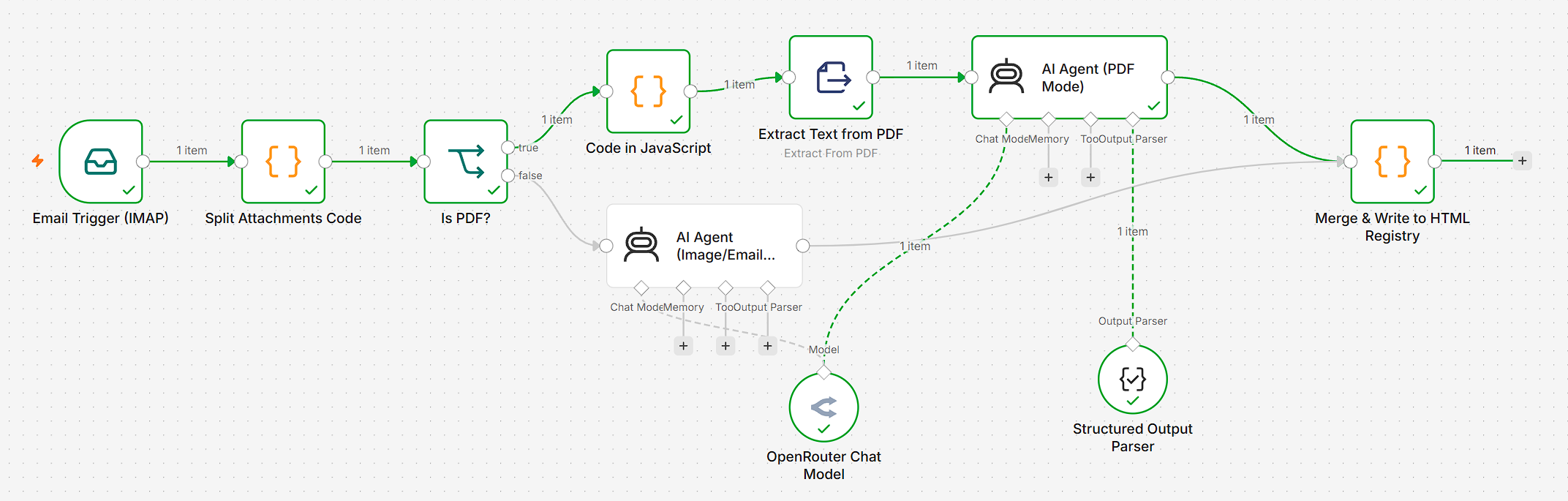
Step-by-Step Architecture & Implementation
Step 1: Mail Trigger (Email Trigger IMAP)
- What it does: The workflow runs automatically via an IMAP trigger that monitors incoming messages in real time.
- Technical details: Secure connection to the mail server is configured to intercept emails with attachments (digital invoices or receipt photos) and feed them into the pipeline.
Step 2: Attachment Splitting & Normalization (Split Attachments Code)
- What it does: Emails often contain multiple files or secondary elements (e.g., company logos or signatures). This custom JavaScript node isolates each attachment separately.
- Technical details: Binary file buffers are extracted, unnecessary elements are filtered out, and metadata is standardized so that every file moves down the pipeline as a clean data stream.
Step 3: Format-Based Conditional Branching (Is PDF?)
- What it does: Determines whether the incoming file is a structured PDF document or an image (JPEG, PNG, etc.).
- Technical details: A conditional Switch node is used, splitting the pipeline into two optimized parallel paths:
- True Branch (PDF): Routes text documents to the text extraction stage.
- False Branch (Images/Email): Directs visual files straight to the multimodal AI agent.
Step 4: Text Extraction vs. Multimodal Processing
- For PDFs: The file passes through the Extract Text from PDF node to efficiently extract raw text before sending it to the text AI agent.
- For Images: The file skips text extraction and goes directly to the multimodal AI agent capable of analyzing documents visually (OCR + deep context comprehension).
Step 5: AI Data Extraction (AI Agent & Structured Output Parser)
- What it does: Transforms unstructured documents into strictly typed JSON data.
- Technical details:
- Powered by efficient LLMs via the OpenRouter Chat Model.
- Integrated with a Structured Output Parser that strictly enforces the response schema.
- The AI agent accurately recognizes and extracts key financial fields: invoice number, date, vendor name, line items, quantity, and total amount.
Step 6: Data Cleanup, Normalization & Duplicate Prevention (Merge & Write to HTML Registry)
- What it does: Merges parallel execution flows, prevents duplicate records, and prepares data for storage.
- Technical details:
- Branch Merging: Reconnects PDF and image processing results back into a single stream.
- Price Normalization: Custom JS code strips currency symbols, replaces commas with periods, and formats prices as numbers with two decimal places (e.g., 145.00) to ensure proper sorting.
- Duplicate Check: Compares new entries with existing records in the registry using a unique composite key (Date + Invoice Number + Amount) to prevent duplicates.
- HTML Generation & Sorting: Automatically sorts records in chronological order and updates the local standalone
invoice.htmlfile, which includes an embedded client-side table sorting script (enabling column header clicking for sorting).
Tech Stack
n8n (Self-hosted / Local-first)
Docker
Claude Code
OpenRouter API
Multimodal LLMs
Structured Output Parsers
JavaScript (Node.js)
IMAP
HTML5 / CSS3